Copyright and other protections apply. Please see the accompanying LICENSE and CREDITS file(s) for rights and restrictions governing use of this software. All rights not expressly waived or licensed are reserved. If those files are missing or appear to be modified from their originals, then please contact the author before viewing or using this software in any capacity.
Introduction
django-emojiwatch is a bare bones Slack app for posting custom emoji updates to a designated channel.
It is implemented as a Django app.
It was loosely inspired by Khan Academy’s emojiwatch, which provides similar functionality, but for hosting on on Google App Engine.
License
django-emojiwatch is licensed under the MIT License.
See the LICENSE file for details.
Source code is available on GitHub.
Installation
Django
Installation can be performed via pip (which will download and install the latest release):
% pip install django-emojiwatch
...
Alternately, you can download the sources (e.g., from GitHub) and run setup.py:
% git clone https://github.com/posita/django-emojiwatch
...
% cd django-emojiwatch
% python setup.py install
...
Now you can add it to your DJANGO_SETTINGS_MODULE:
INSTALLED_APPS = (
  # ...
  'emojiwatch',
)

EMOJIWATCH = {
  'slack_verification_token': '...',
}
And add it to your site-wide URLs:
from django.conf.urls import include, url

urlpatterns = (
  # ...
  url(
    r'^emojiwatch/',  # or werever you want
    include('emojiwatch.urls'),
  ),
  # ...
)
If you haven’t already, you’ll also need to enable the admin site for your Django installation.
Configuring Token Encryption in Django’s Database
Auth tokens and notes associated with a watcher are encrypted in the Django database using django-fernet-fields.
By default, the encryption key is derived from the SECRET_KEY Django setting.
To override this, use the FERNET_KEYS and FERNET_USE_HKDF settings.
See the docs for details.
Slack App and Watcher Setup
Create a new Slack app or a legacy Slack app.
Once created, navigate to the
Basic Informationsettings section and copy theVerification Token(e.g.,NS3PYxg1QR1l7s2G0fRDZ8uK):
This is what you’ll use as the
EMOJIWATCH['slack_verification_token']Django setting.Add the
emoji:readandchat:write(orchat:write:botfor legacy Slack apps) scopes to your app: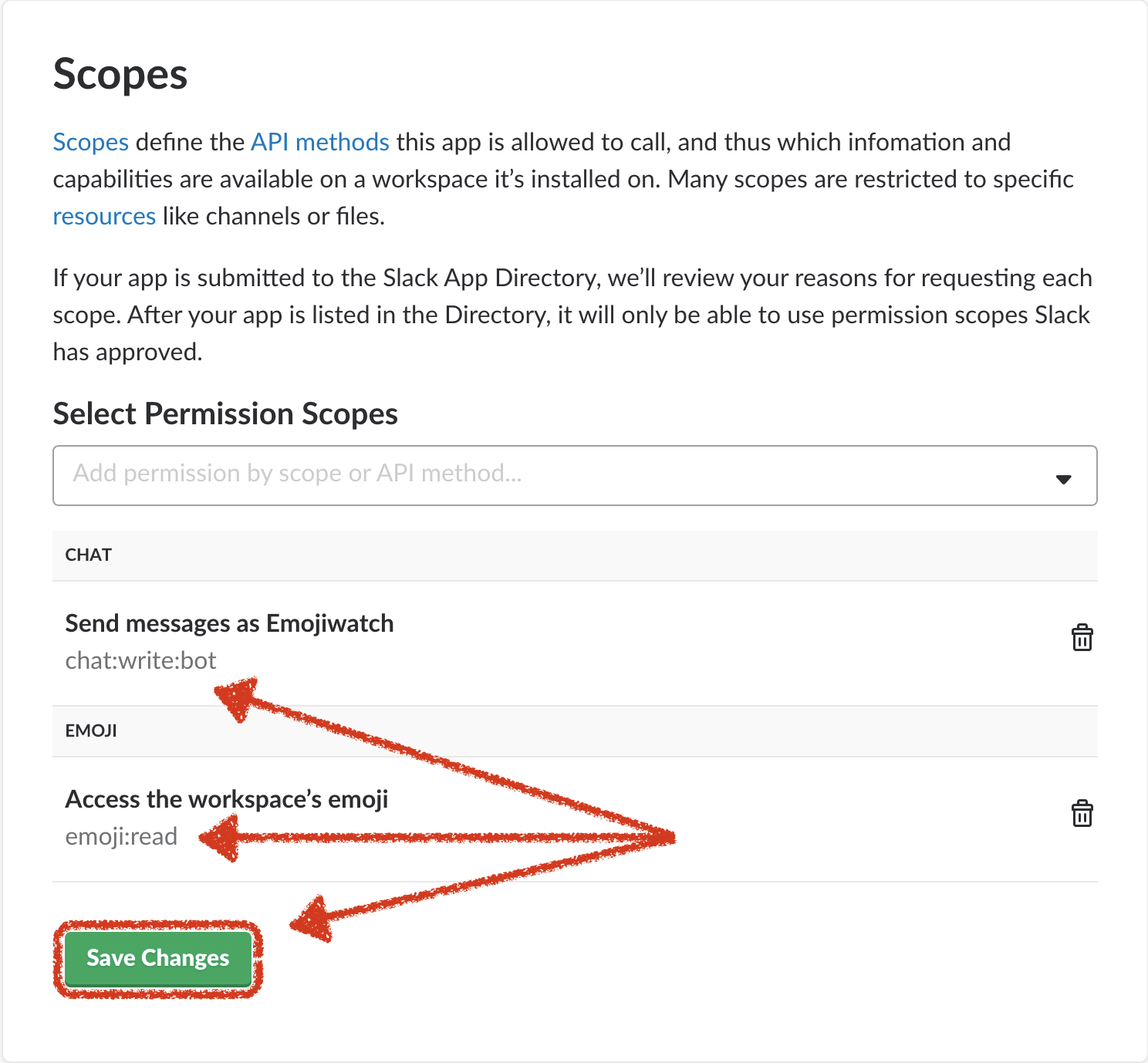
Navigate to the
OAuth & Permissionfeatures section. If necessary, clickInstall App to Workspace:
You’ll be asked to authorize your new app in your workspace:

Click
Authorize.Copy the
OAuth Access Token(e.g.,xoxp-3168...db0b5):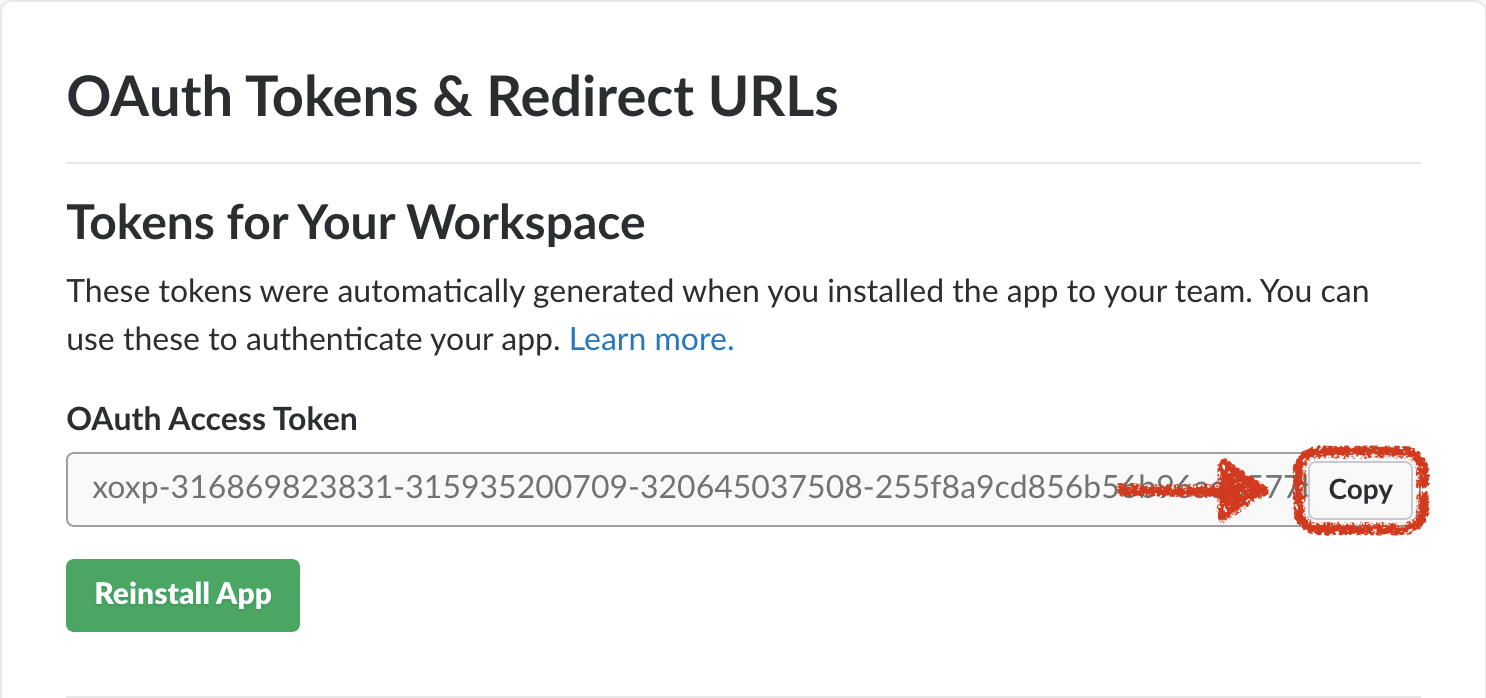
This is what you’ll use when creating the
Slack Workspace Emoji Watcherbelow.If you haven’t already, install
emojiwatchinto your Django project. (See the Django installation section above.) Navigate to your Django project’s admin interface and add a newSlack Workspace Emoji Watcherwith your Slack team ID, your OAuth access token, and the Slack channel ID to which you’d like Emojiwatch to post messages: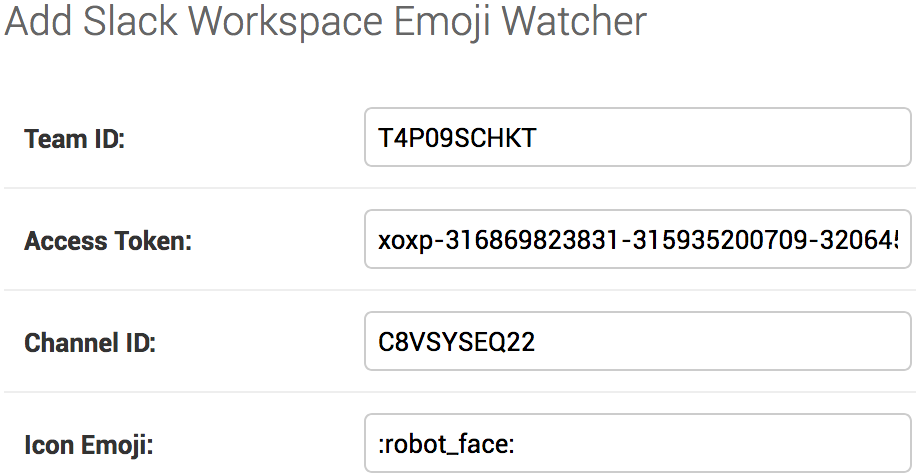
Your Slack team ID can be determined by navigating to any channel within your workspace, and looking at
boot_data.team_idin your browser’s JavaScript console:>> boot_data.team_id "T4P09SCHKT"
Your Slack channel ID can be found in the URL when navigating to that channel:
https://<workspace-name>.slack.com/messages/C8VSYSEQ22/details/
                                            ^^^^^^^^^^
Once your
Slack Workspace Emoji Watcheris saved, you should be able to test your configuration by faking a minimalistemoji_changedevent viacurl:curl --verbose --data '{ "token": "NS3PYxg1QR1l7s2G0fRDZ8uK", "team_id": "T4P09SCHKT", "type": "event_callback", "event": { "type": "emoji_changed", "subtype": "add", "name": "faked-new-emoji", "value": "<some-img-url>" } }' https://<django-project-base>/emojiwatch/event_hook
<django-project-base>is your domain, and optionally any path to your top-level Django project. If your Django project provides your root path, this will just be a domain name. Assuming everything has been set up correctly so far, this should result in a post to your Slack channel (e.g.,C8VSYSEQ22):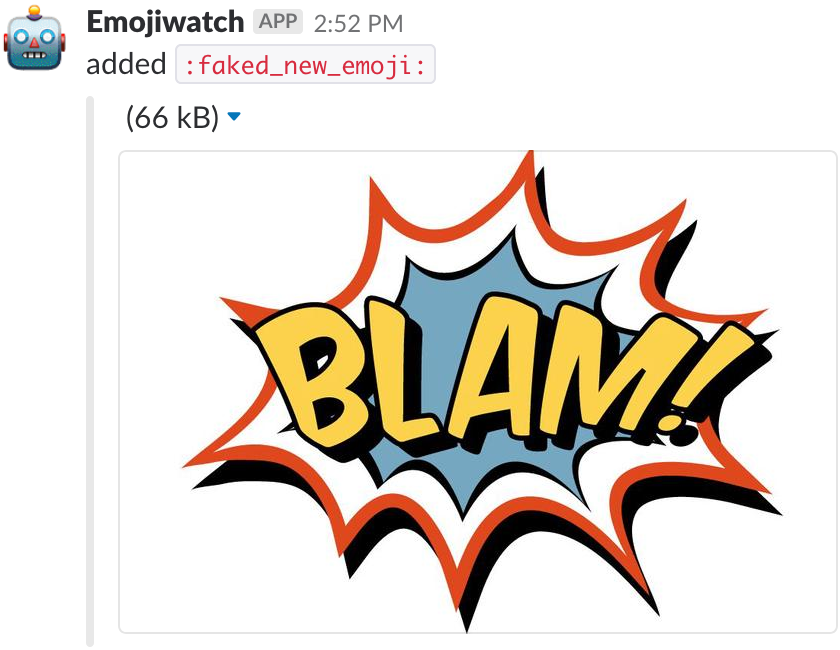
If not, examine the output from your
curlcall for any clues as to what went wrong. See the Troubleshooting section below for additional suggestions.Now you’re ready to start receiving events. Navigate to your Slack app’s
Event Subscriptionsfeatures section. Turn events on and add your Django project’s publicly-visible HTTPS URL. (This is the same URL you used with yourcurlcommand above.) Slack will attempt to post to that URL to verify its accessibility. Once verified, subscribe to theemoji:readevent and clickSave Changes.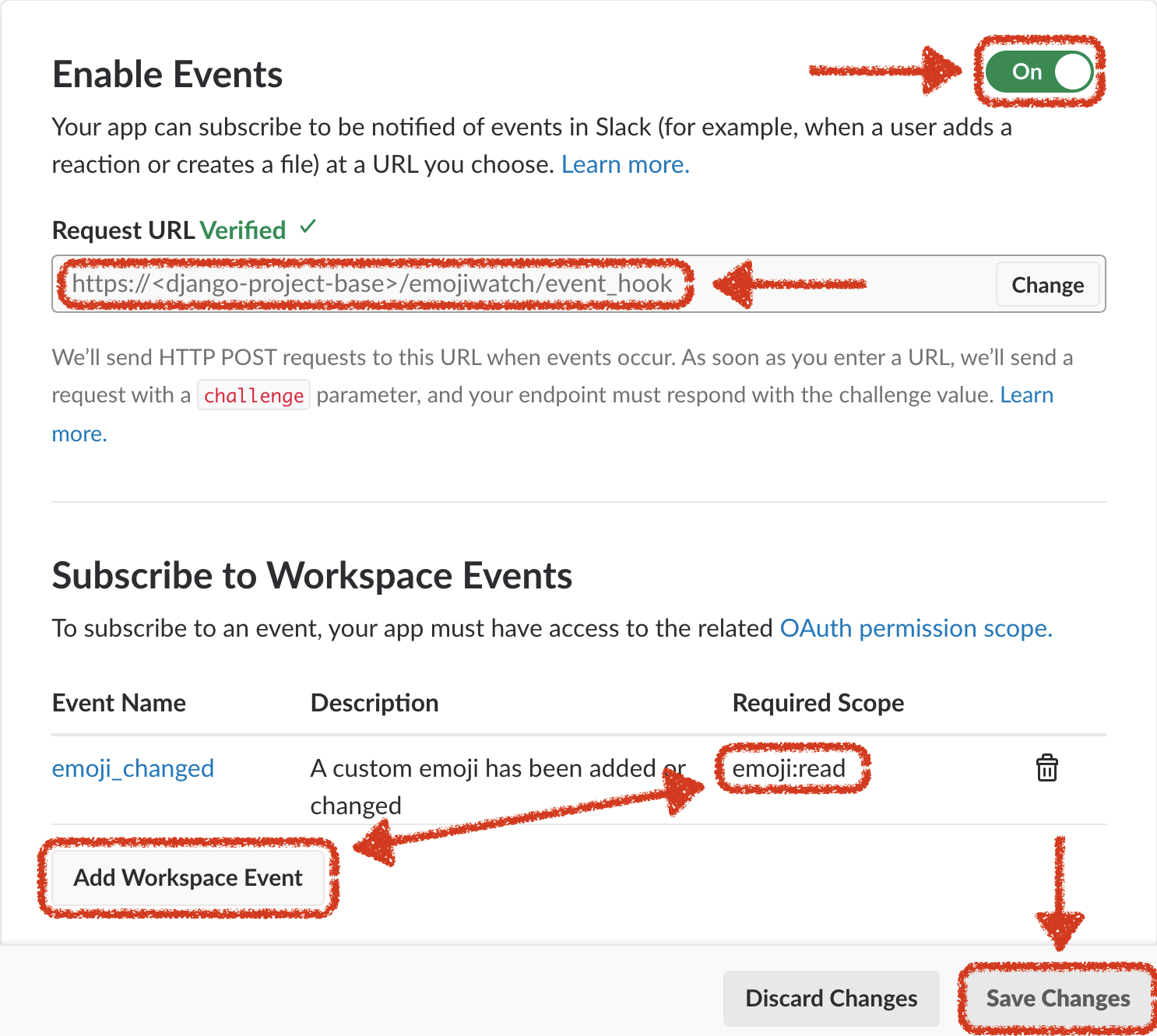
That’s it! You should now get notices to your designated channel whenever you add or remove custom Emojis to your workspace.
Troubleshooting
If your
curlcommand is succeeding, but you’re still unable to see a post to your Slack channel, try turning on logging output via your Django settings. Here’s a minimalist configuration if you don’t already have one:import logging LOGGING = { 'version': 1, 'disable_existing_loggers': False, 'formatters': { 'standard': { 'format': '%(asctime)s\t%(levelname)s\t%(name)s\t%(filename)s:%(lineno)d\t%(message)s', }, }, 'handlers': { 'default': { 'class': 'logging.StreamHandler', 'level': 'DEBUG', 'formatter': 'standard', }, }, 'loggers': { '': { 'handlers': ['default'], 'level': 'DEBUG', 'propagate': False, }, 'django': { 'level': 'INFO', 'propagate': True, }, }, }Try your
curlcommand again. The Django console log should provide some clue as to what’s wrong.Some common causes are:
- Not properly adding or configuring the
emojiwatchapp in your Django project.- Omitting or using an incorrect value for your
EMOJIWATCH['slack_verification_token']Django setting.- Using an incorrect URL for your Django project instance or the
django-emojiwatchevent handler. (Note: Slack requires event handlers to support HTTPS.)- Not creating (or neglecting to save) your
Slack Workspace Emoji Watcherobject via your Django project’s admin interface.- Using incorrect values for your team ID, access token, or channel ID.
- Failing to properly format a faked
emoji_changedevent when invokingcurl.
Requirements
You’ll need a Slack account (and admin approval) for setting up your Slack app. A modern version of Python is required:
django-emojiwatch has the following dependencies (which will be installed automatically):
Django(1.8 or higher)django-fernet-fieldsfutureslacker